Chess.com Game Review Alternatives for Post-Game Analysis
We loaded the same 33-move game in Chess.com Analysis, Lichess, and Tera Chess. Here’s which workflow fits the review you want to do.

If you want an alternative to Chess.com Game Review, choose by what you want to do next. Use Chess.com Analysis to inspect variations on Chess.com, or Lichess Analysis to load a PGN and run Stockfish in your browser. Use Tera Chess when you want to start practice from an exact position or build lessons from a library of completed Chess.com games. Chess.com’s built-in Game Review is still useful when you want its move classifications and guided retry experience.
What we found using the same game
Tera Chess publishes this comparison and makes one of the tools. We used the same completed sample PGN and stopped just after 23…Qd8. The task was to open the game, return to White’s 24th move, and find a line White could play. We used signed-out desktop sessions for Chess.com and Lichess, and a disposable local Tera Chess environment for the analysis and practice checks. The test took place on November 27, 2026.
- Chess.com Analysis
- The public board loaded the game and showed both mating lines at move 24. The separate Game Review button led to sign-up in this guest session.
- Lichess Analysis
- The public board imported the full PGN and gave a mating line using its local browser engine. The default engine view in this test showed one candidate line.
- Tera Chess
- The Analysis board loaded all 33 moves and returned both mating lines. Starting practice from the same position let us play the selected continuation and retrieve the saved result.
Both mating lines win in two moves. The tools used different engine settings, and the Lichess view displayed one line in the session we used. The number of lines shown and the order of equally good moves are details of the analysis setup. This example measures which tasks each workflow let us complete.
The PGN is an illustrative game composed for this site. It has all the moves and the actual result. Use the same file if you want to repeat the test, or substitute a completed game of your own. Download the benchmark PGN
Follow the exact decision at move 24
White eventually won by checkmate on move 33. At move 24, White played Nc6+, clearing the queen’s diagonal from b2 to h8 and attacking the black queen on d8 with the knight. Black interposed …f6, and White played 25.Nxd8. Winning the queen worked. The question for the review was whether White could finish sooner.
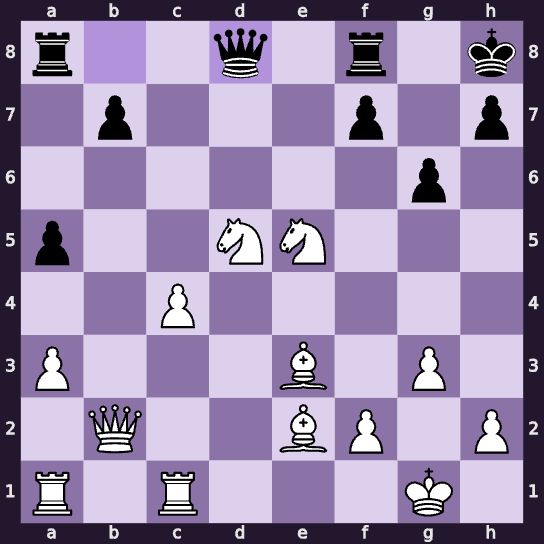
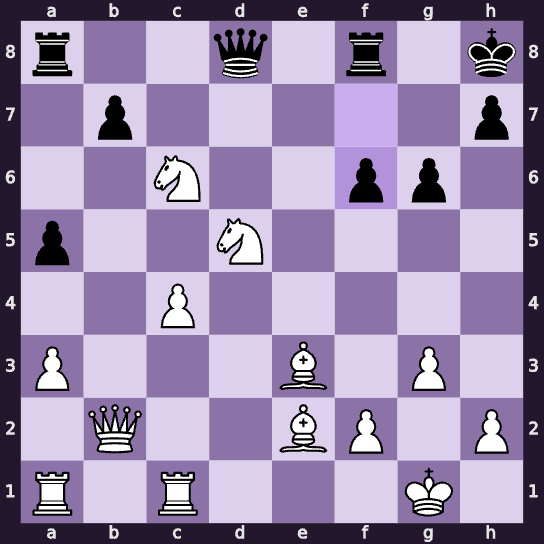
Rewind to 23…Qd8 in each analyzer. At that point the knight belongs on e5. If you start with it on c6, the move was already played and the engine is answering a different question. You can use the first diagram or copy the FEN below to confirm you are comparing the same board.
Before White’s 24th mover2q1r1k/1p3p1p/6p1/p2NN3/2P5/P3B1P1/1Q2BP1P/R1R3K1 w - - 1 24
Try finding two candidate checks before opening the engine panel. Name how Black can answer each check. Then compare your replies with the analysis. If you want to do the puzzle first, the free example starts from the same game and lets you rewind to White’s turn. Play the sample position
Read the checked mating lines
24.Nxg6+ Kg8 25.Qh8#. White’s knight clears the queen’s diagonal and protects h8 from g6, so the king cannot take the queen when it arrives.
24.Nxf7+ Kg8 25.Nh6#. The knight ends up on h6, giving check to g8 and covering f7. The queen covers g7 and h8 along the diagonal.
Both first moves force …Kg8. Compare that with 24.Nc6+, when Black has the extra defense …f6. That extra reply is the reason the original move wins material and the other two finish immediately.
How to review a game in each tool
Chess.com Analysis and Game Review
Open the public Chess.com Analysis board and use its PGN, FEN, or study link field. Load the PGN and select 23…Qd8 in the move list. In our test the paste field was single-line, so we replaced line breaks with spaces before loading. The page also showed an upload control. Confirm the complete game loaded by finding the last move, 33.Qg7#, before going back to move 24. Chess.com Analysis board
At the chosen position, Stockfish 19 Lite showed Nxg6+ and Nxf7+ with the mating follow-ups. This was enough to investigate the decision without an account. When we then selected Game Review, the guest session opened a registration form before giving a full report. The analysis board and the full review are separate surfaces, even though you can open one from the other.
Choose Game Review when you want the platform to summarize a game, classify moves, and guide you through retries. Chess.com’s membership documentation lists one full Game Review analysis per day for Basic members and describes unlimited review on Premium plans. Check that page for the plan details that apply to your account. Our test stayed signed out. Game Review and Self Analysis support · Chess.com membership features
Lichess Analysis board
Open the Analysis board, paste the completed game into the PGN field, and choose Import PGN. Select 23…Qd8 in the moves and switch on the local computer evaluation. We checked the FEN after selecting the move. It matched the exact board above. The browser engine, labeled SF 19 1MB in the tested session, showed 24.Nxg6+ Kg8 25.Qh8#. Lichess Analysis board
The public board also exposed a Practice with computer control. Lichess documents Learn from Your Mistakes for analyzed completed games. Choose the browser analysis route when you have a PGN and want to examine candidate lines quickly. For other Lichess game features, check the tools available on the specific game you opened. Lichess analysis and Learn from Your Mistakes documentation
When the panel gives you one solution, try your other candidate directly and check what the defender can do. In the sample, the bishop or pawn exchanges elsewhere in the game can wait. You only need the two-move line that settles the decision you picked.
Tera Chess Analysis board and personal practice
In Tera Chess, open Analysis board → Position & PGN, paste the completed PGN, and choose Load PGN. Use the move history to return to the move before your decision. In the sample that is 23…Qd8. Use Analyze position to check your candidates. The local test returned both mating lines from the same position. Use the copyable FEN if you only need the board and whose turn it is.
When you want to play it out, go back to Position & PGN and choose Practice this position. In the disposable practice session, we played Nxg6+, checked Black’s reply …Kg8, then played Qh8#. We could retrieve the completed practice position afterward. The hosted training workspace requires a Tera Chess account. You can play this guide’s linked sample before signing in.
Use username import when your goal is to work across multiple games. Tera Chess imports public completed standard games from Chess.com, analyzes them in batches, and selects positions for training when they are available. If you want one specific move regardless of what the library surfaces, start from its position manually. Import and personal practice steps
Which option fits your next review?
You just finished a game and want a quick summary
Open Game Review in Chess.com if you already played the game there and have a review available. Use the report to find one decision. Go to the board, replay the move you played, then test a stronger candidate. The label “miss” or “blunder” is a place to start. The reply that changes the position is the part you want to remember.
You have a PGN and want to inspect one move
Use whichever public analysis board opens the PGN where you are already comfortable navigating. Turn off evaluation for your first pass if you want to test what you see yourself. Stop one ply before your move, then switch analysis on and compare your expected reply with the checked line. For this job, a manual analysis board gives you the information you need.
You want to practise decisions you keep missing
Save the board, side to move, original choice, and the reply you overlooked. Start practice from that position or build a library of recurring examples. In the benchmark, the note was “After opening a line with check, ask whether the opponent can block it.” Try the old position later, then see whether you can spot the same idea on a fresh board. A reusable post-game review note
Repeat the comparison with a game you played
Pick a completed game where an opponent’s reply surprised you. Export it once, then use the same PGN in each tool you want to compare. Mark the last move before your decision. If two boards disagree about whose turn it is, or one opens at the end of the game, use the move list and the FEN to align them before comparing any engine results.
- Find the decision without a label. Step through the game until you can say what you were trying to do. Record the move number and the reply you expected.
- Compare two candidates on the same board. Test the move you played and one other candidate. In each line, find the first opponent reply that changes the result. If a tool gives you a long variation, stop at the first check, capture, or defense that explains the difference.
- Try the work you actually want to repeat. If your goal is a quick recap, see how easily you can jump between the report and the critical board. If your goal is practice, see whether you can start from that position, play the opponent’s reply, and return to the attempt later.
In our sample, all three boards let us get to the same critical decision. The extra step that mattered depended on the job. The Chess.com guest analysis was enough to check the tactics. The Lichess board made the starting FEN visible alongside the moves. The Tera Chess run let us carry the board into a saved practice session. Those are three different results you can look for in your own test.
Carry one useful conclusion out of the tool
Write down the action the review changes. For the sample game, the action is to check whether a discovered check can be blocked before choosing the follow-up. On a different board, the action might be to verify whether a piece can legally recapture or whether a king has an escape square. A screenshot of the finished engine line is useful if it helps you rebuild that decision. Keep the starting position with it so you can ask yourself the question again.
Common questions about Game Review alternatives
Can I analyze a game without an account?
The public analysis boards at Chess.com and Lichess loaded the benchmark PGN in our signed-out sessions. Chess.com’s full Game Review opened a sign-up form in that same test. If the goal is to check one line, start with the public board and see if it answers your question.
Why can two tools suggest different moves?
The analysis settings can differ, and some positions have more than one move that reaches the same result. In this game, the two suggested mating moves both force a mate in two. Confirm what the opponent can do, especially if a tool shows only one line.
How do I move my Chess.com game to another tool?
Export the PGN from your completed game, then paste or load it in the other board. If you only need a single decision, copy the FEN before that move. Check the side to move and keep the original game link if you want to return to the rest of the moves later. Chess.com’s PGN export instructions